A simple Rust profiler that shows exactly why your code is slow
Performance profiling for developers and coding agents. Profile CPU, memory allocations, async tasks, SQL queries, I/O, and lock contention in one place. Explore performance metrics in a live TUI, or export to Prometheus and Grafana when you need production monitoring..
Find bottlenecks locally, then use hotpath-cloud to track performance changes across pull requests.




Try the TUI demo via SSH - no installation required:
Or let your AI coding agent set up profiling:
hotpath-rs is an easy-to-configure Rust performance profiling toolkit that shows exactly where your code spends time, burns CPU, and allocates memory.
It helps you distinguish between functions that are slow because they wait on I/O and those that are CPU-intensive. Instrument functions, channels, futures, streams, SQL queries, HTTP calls, and byte-level I/O to find bottlenecks and focus optimizations where they matter most. Get actionable insights into time, memory, and async data flow with minimal setup. For noise-free CI benchmarks, it can also count executed CPU instructions with Callgrind instead of measuring wall-clock time.
Used by 195 open-source projects, including:


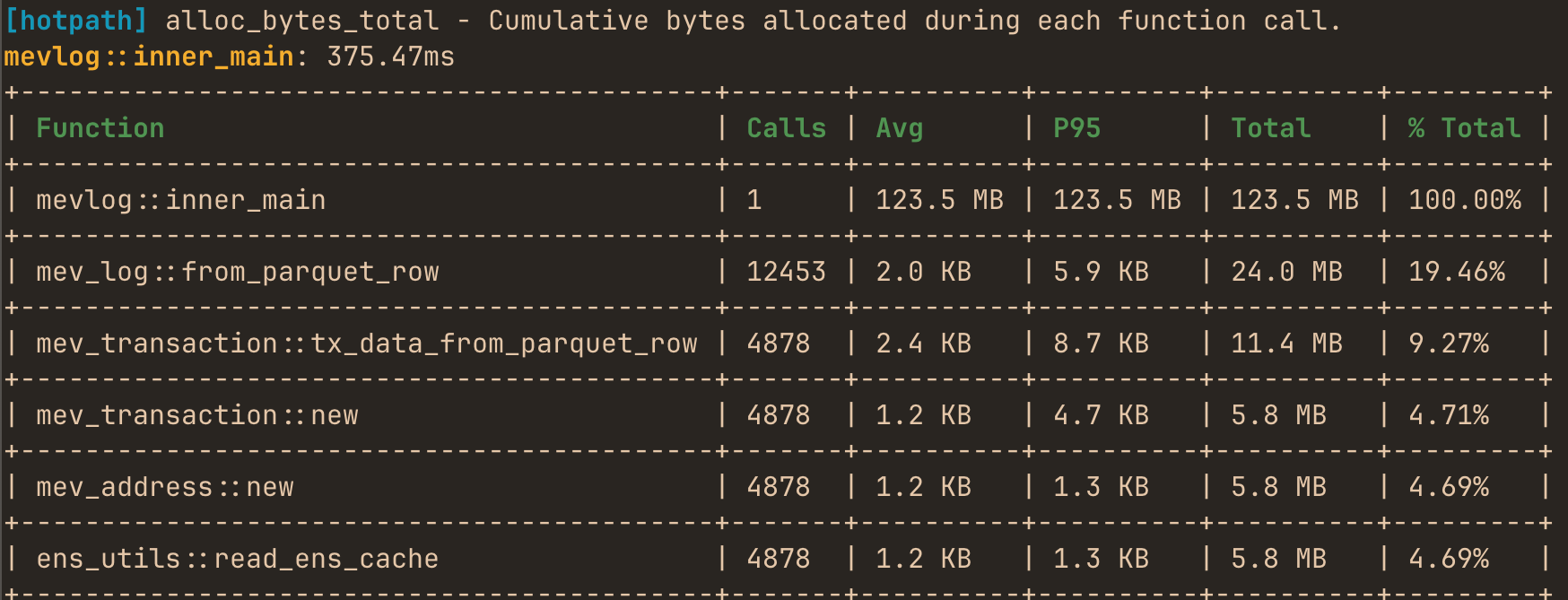
You can use it to produce one-off performance (timing, memory or CPU) reports:
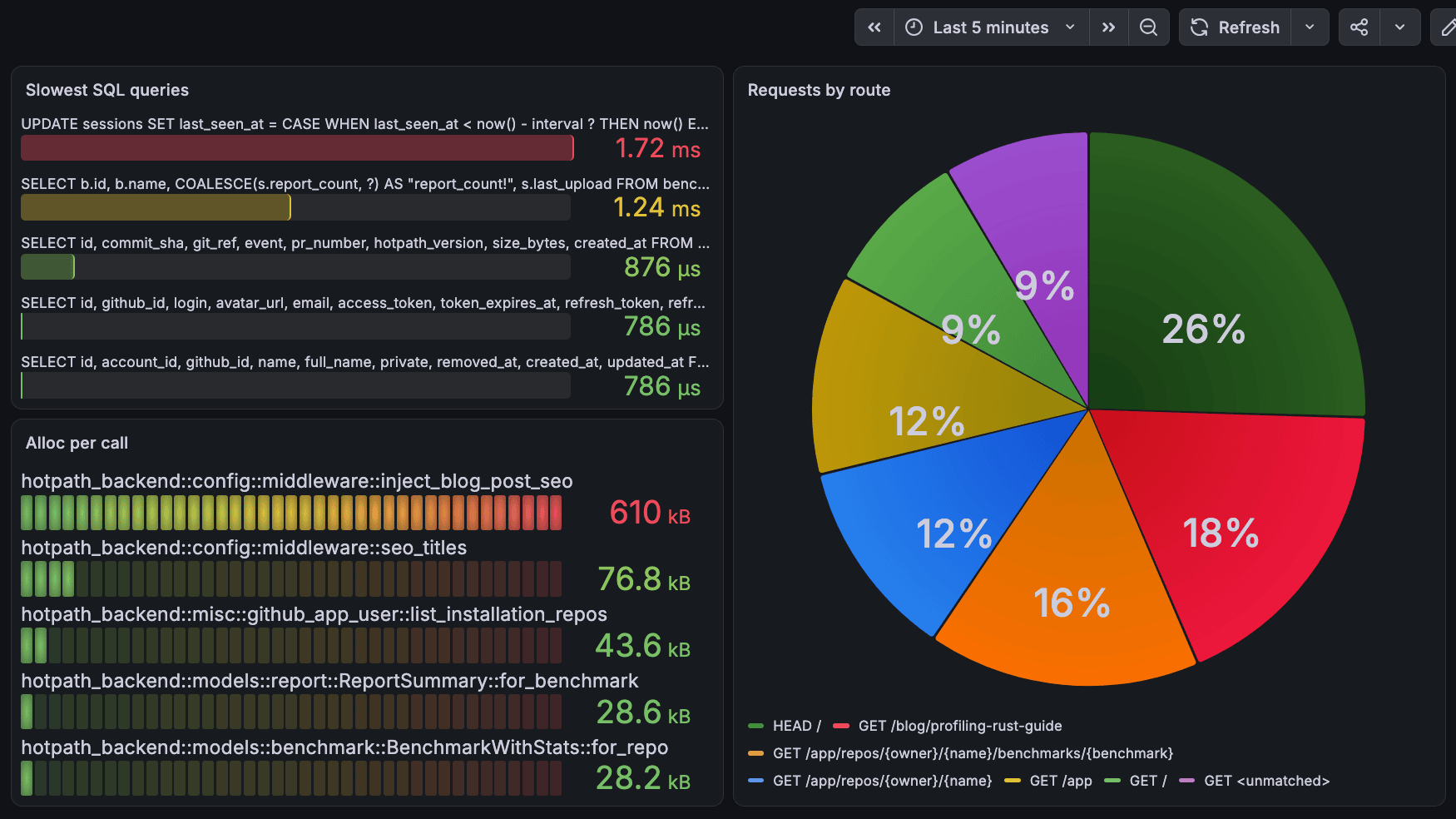
correlate all performance signals in Grafana with minimal profiling overhead:
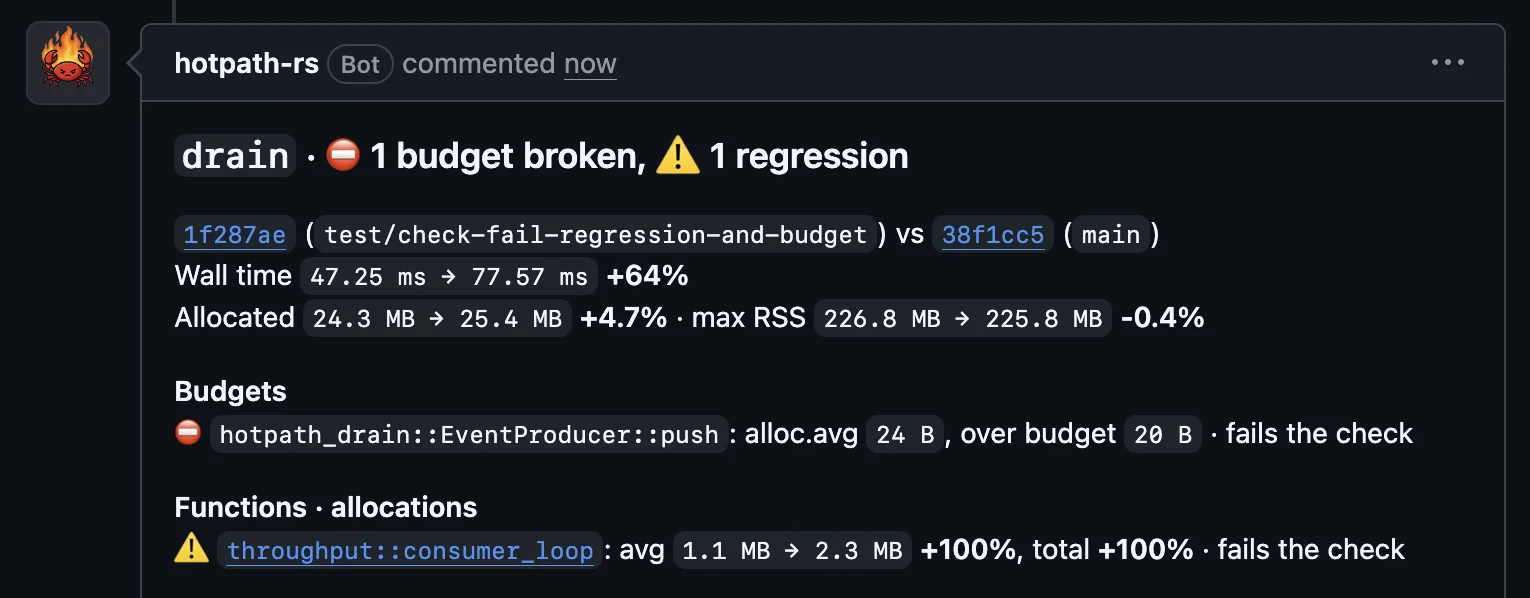
catch performance regressions on every pull request with a simple CI integration:
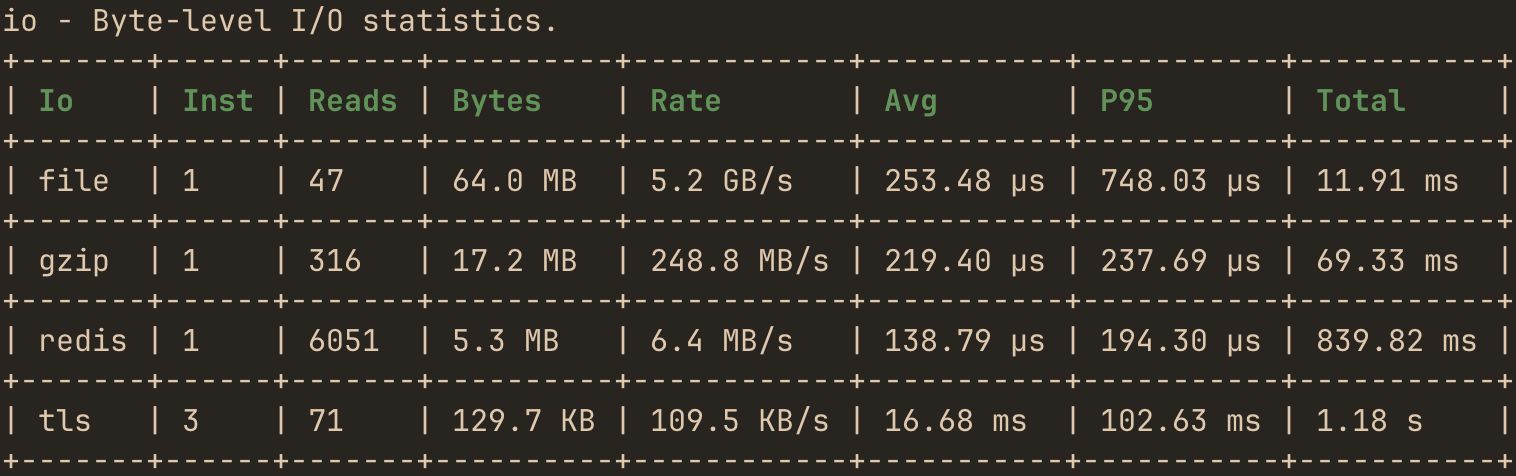
inspect throughput and latency of network, file or compression I/O streams:
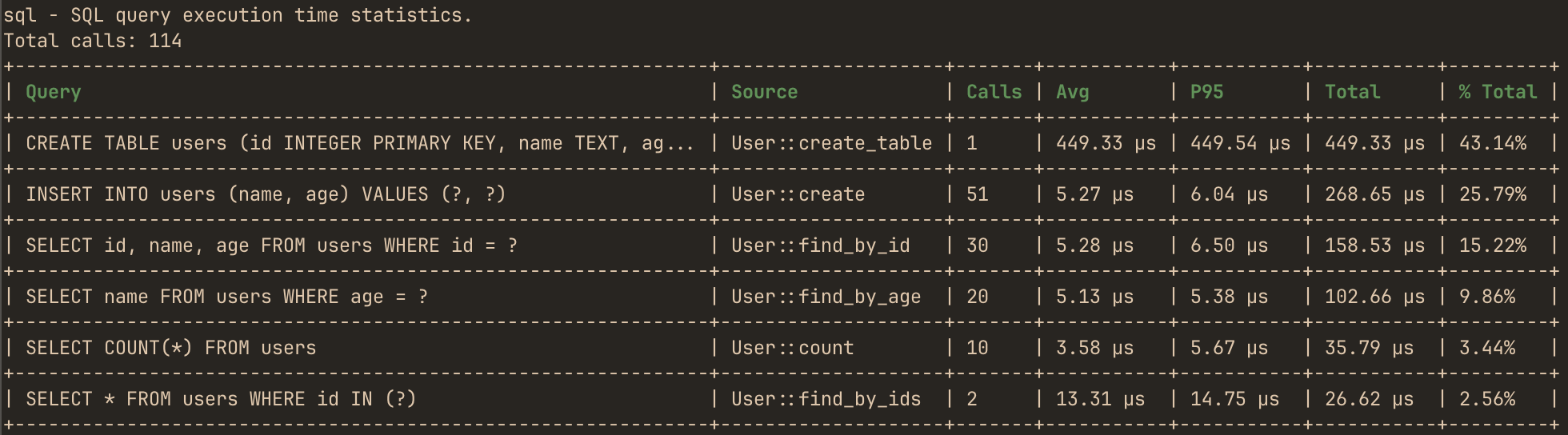
analyze SQL/HTTP calls performance with automatic source function attribution:
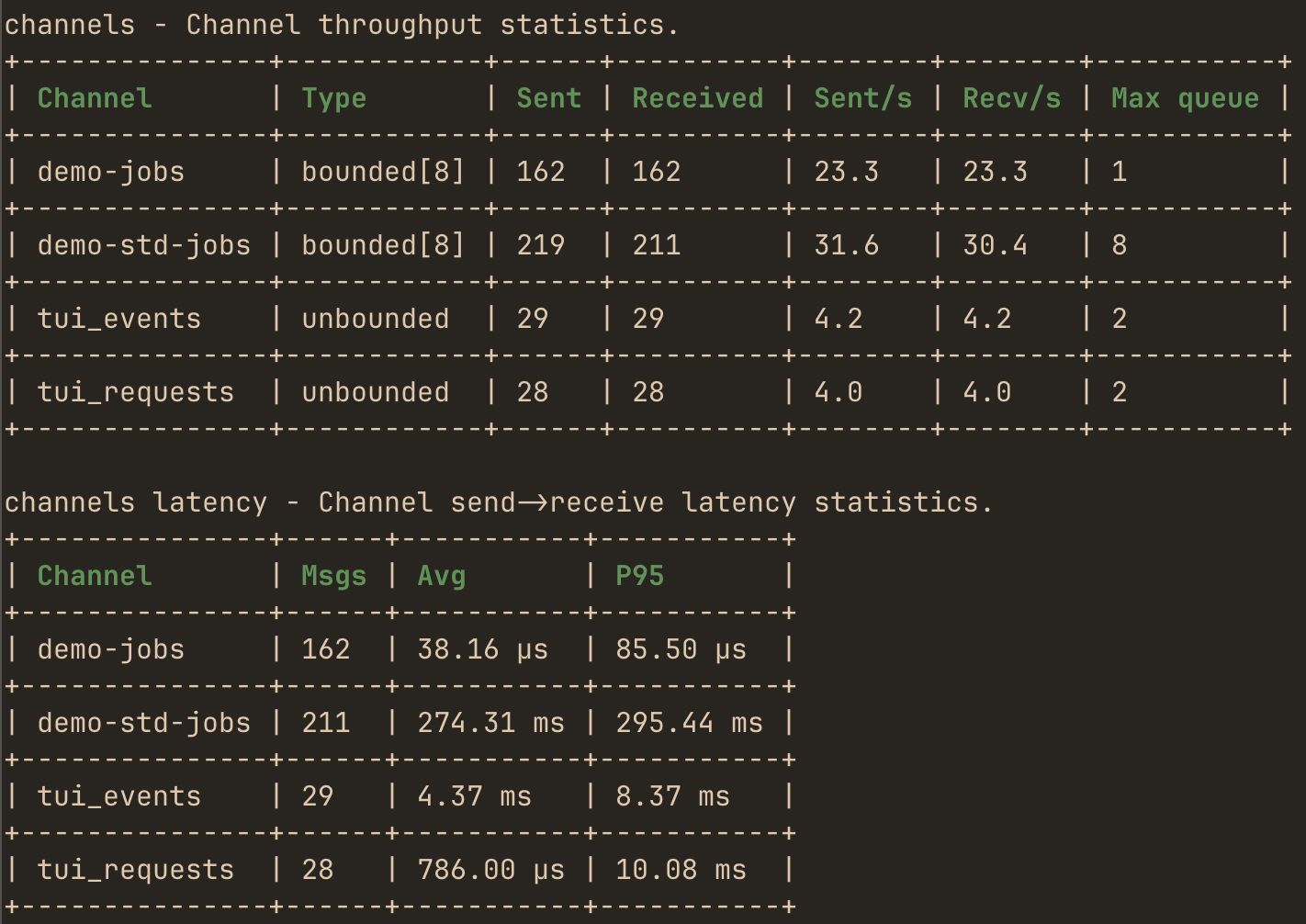
monitor throughput, performance and max queue depth of instrumented channels:
or use the live TUI dashboard to monitor real-time performance and async data flow metrics with debug info:
Features
- Time, CPU & memory profiling - identify expensive functions, allocation hotspots, and investigate memory leaks.
- Async observability - futures, channels and streams.
- I/O monitoring - bytes, throughput, latency of any sync or async IO stream like files, TCP, or compression.
- SQL query profiling - query performance metrics for sqlx and Diesel.
- HTTP calls profiling - per-endpoint latency and error metrics for reqwest and ureq.
- HTTP server profiling - per-route response time and error metrics for axum.
- Concurrency metrics - Mutex/RwLock wait time and contention.
- Tokio runtime monitoring - workers, scheduling and queues.
- Prometheus & Grafana integration - export profiling metrics to your existing dashboards.
- Live TUI dashboard & static reports - real-time or one-off analysis.
- CI regression detection - benchmark every PR automatically.
- Deterministic instruction counts - Callgrind-based CPU measurements, stable across noisy CI runners.
- MCP server and CLI skill for AI agents - analyze profiling and benchmarks data.
- Zero cost when disabled - fully feature-gated.
Getting Started
AI Setup (Recommended)
The quickest way to set up hotpath is to let your own AI coding agent do it. Paste this prompt into Claude Code, Codex, OpenCode, Cursor or any other coding agent, inside your project repo:
Set up hotpath-rs profiling in this Rust project using the instructions at https://hotpath.rs/agent/setup
The agent inspects your project, including workspaces and any existing hotpath setup, adds the feature-gated dependency, instruments main and a small starting set of hot functions, channels and locks, and verifies that everything compiles with profiling enabled and disabled. When the project has a workload that exits, it runs it and shows you the first report. It then explains how to run profiling and the live TUI. It finally asks once whether to optionally set up hotpath-cloud to benchmark pull requests in CI.
The prompt is a one-time project setup. The hotpath-rs agent skill is what stays: reusable hotpath knowledge your agent loads in every later session. To install it, for example in a repo that already uses hotpath, run:
npx skills add hotpath-rs/hotpath --skill hotpath-rs
The skill maps every hotpath task, from instrumenting a crate to fixing a regression flagged in CI, to the documentation page that covers it, so your agent fetches the current docs instead of relying on its memory. Your agent remains in control: you review and approve edits through its regular permission prompts.
Manual installation
Add to your Cargo.toml:
[dependencies]
hotpath = "0.29"

[features]
hotpath = ["hotpath/hotpath"]
hotpath-alloc = ["hotpath", "hotpath/hotpath-alloc"]
hotpath-prometheus = ["hotpath", "hotpath/hotpath-prometheus"]
This config ensures that the lib has no compile time or runtime overhead unless explicitly enabled via one of the hotpath features. Every profiling feature also enables hotpath, so a single flag like --features=hotpath-alloc is enough. All the lib dependencies are optional (i.e. not compiled) and all macros are noop unless profiling is enabled.
Basic setup
You’ll need only #[hotpath::main] and #[hotpath::measure] macros to get started:
#[hotpath::measure]
fn sync_function(sleep: u64) {
    std::thread::sleep(Duration::from_nanos(sleep));
    let vec1 = vec![1, 2, 3];
    std::hint::black_box(&vec1); // force mem allocation
}

#[hotpath::measure]
async fn async_function(sleep: u64) {
    tokio::time::sleep(Duration::from_nanos(sleep)).await;
}

// When using with tokio, place the #[tokio::main] first
#[tokio::main]
#[hotpath::main]
async fn main() {
    for i in 0..1000 {
        sync_function(i);
        async_function(i * 2).await;

        hotpath::measure_block!("custom_block", {
            std::thread::sleep(Duration::from_nanos(i * 3))
        });
    }
}
Now, run your program with hotpath (and optionally hotpath-alloc) feature:
cargo run --features='hotpath-alloc'
On exit it will print a report with timings, memory allocations and thread usage metrics:
[hotpath] 1.20s | timing, alloc, threads

timing - Function execution time metrics.
+------------------------------+-------+----------+----------+----------+---------+
| Function                     | Calls | Avg      | P95      | Total    | % Total |
+------------------------------+-------+----------+----------+----------+---------+
| docs_example::main           | 1     | 1.20 s   | 1.20 s   | 1.20 s   | 100.00% |
+------------------------------+-------+----------+----------+----------+---------+
| docs_example::async_function | 1,000 | 1.16 ms  | 1.24 ms  | 1.16 s   | 96.84%  |
+------------------------------+-------+----------+----------+----------+---------+
| custom_block                 | 1,000 | 16.86 µs | 29.50 µs | 16.86 ms | 1.41%   |
+------------------------------+-------+----------+----------+----------+---------+
| docs_example::sync_function  | 1,000 | 12.16 µs | 23.84 µs | 12.17 ms | 1.02%   |
+------------------------------+-------+----------+----------+----------+---------+

alloc-bytes - Exclusive allocation bytes by each function (excluding nested calls).
Total: 100.1 KB
+------------------------------+-------+---------+---------+---------+---------+
| Function                     | Calls | Avg     | P95     | Total   | % Total |
+------------------------------+-------+---------+---------+---------+---------+
| docs_example::main           | 1     | 88.4 KB | 88.4 KB | 88.4 KB | 88.29%  |
+------------------------------+-------+---------+---------+---------+---------+
| docs_example::sync_function  | 1,000 | 12 B    | 12 B    | 11.7 KB | 11.71%  |
+------------------------------+-------+---------+---------+---------+---------+
| custom_block                 | 1,000 | 0 B     | 0 B     | 0 B     | 0.00%   |
+------------------------------+-------+---------+---------+---------+---------+
| docs_example::async_function | 1,000 | 0 B     | 0 B     | 0 B     | 0.00%   |
+------------------------------+-------+---------+---------+---------+---------+

threads - Thread CPU and memory statistics. (Max RSS: 8.6 MB, Alloc: 108.5 KB, Dealloc: 123.8 KB, Diff: -15.3 KB, 5/15)
+-----------------+------+------+----------+---------+----------+
| Thread          | Max% | Avg% | Alloc    | Dealloc | Diff     |
+-----------------+------+------+----------+---------+----------+
| main            | 4.5% | 3.8% | 100.1 KB | 46.0 KB | 54.0 KB  |
+-----------------+------+------+----------+---------+----------+
| tokio-rt-worker | 0.0% | 0.0% | 79 B     | 70.1 KB | -70.0 KB |
+-----------------+------+------+----------+---------+----------+
| tokio-rt-worker | 0.0% | 0.0% | 4.2 KB   | 471 B   | 3.8 KB   |
+-----------------+------+------+----------+---------+----------+
| tokio-rt-worker | 0.0% | 0.0% | 3.3 KB   | 407 B   | 2.9 KB   |
+-----------------+------+------+----------+---------+----------+
| hp-functions    | 1.3% | 1.0% | 0 B      | 2.0 KB  | -2.0 KB  |
+-----------------+------+------+----------+---------+----------+
Quick demo
Other than the SSH demo an easy way to quickly try the ratatui.rs-powered TUI is to run it in auto-instrumentation mode. The TUI process profiles itself and displays its own performance metrics in real time.
First, install hotpath CLI with auto-instrumentation and demo mode enabled:
cargo install hotpath --features='tui,hotpath-alloc,demo' --version '^0.29'
Then launch the TUI:
hotpath
and you’ll see timing, memory and other metrics.
Make sure to reinstall it without the auto-profiling features so that you can also observe metrics of other programs!
cargo install hotpath --features='tui' --version '^0.29'
Learn more
Read the complete guide to profiling Rust applications - a comprehensive overview of debugging performance issues in Rust.
Explore the docs for customization options and advanced profiling features.
- Profiling modes - static reports vs live TUI dashboard
- Profiling overhead - per-operation instrumentation cost and time sampling
- Functions - measure execution time and memory allocations
- CPU profiling - attribute CPU samples to instrumented functions
- Threads - monitor threads usage
- Async Data Flow - monitor channels, streams, and futures
- Locks - track Mutex and RwLock wait and hold times
- SQL queries - profile query execution time for sqlx and Diesel
- HTTP requests - profile reqwest and ureq client calls per endpoint
- HTTP server (axum) - profile axum request latency and errors per route
- I/O tracing - monitor bytes, throughput and duration of TCP, Redis, and file operations
- Tokio Runtime - monitor Tokio runtime worker stats and task scheduling
- Debug & Metrics - track custom values with dbg!, val!, and gauge! macros
- Prometheus & Grafana - export metrics to Prometheus and build Grafana dashboards
- hotpath-cloud CI integration - performance regression detection on every pull request
- MCP Server - LLM integration via Model Context Protocol
- Cargo flamegraph alternatives - when to use
hotpathvs sampling profilers like perf and samply - Configuration - explore all config options