Rust SQL Performance Profiling for sqlx, Diesel and Toasty
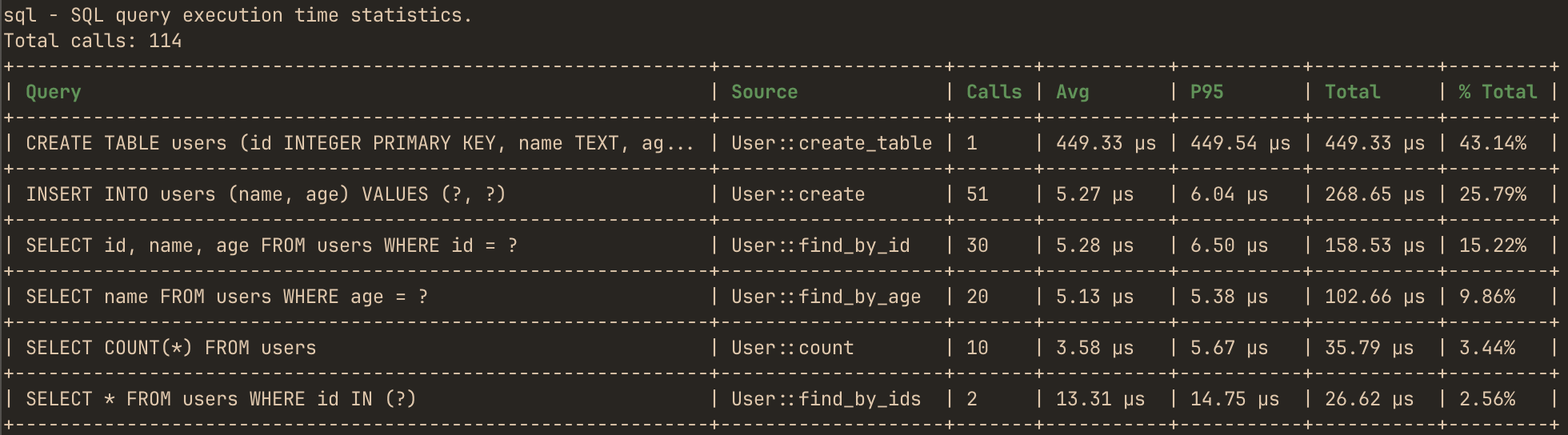
hotpath profiles SQL queries in Rust applications, helping you identify slow statements, repetitive query patterns, and unexpected database activity. Queries are grouped by their normalized SQL text, so parameterized executions of the same statement are reported together. For example, 1,000 executions of SELECT * FROM users WHERE id = ? appear as a single entry with call count, average latency, percentiles, and total execution time.
The same profiling backend powers sqlx, Diesel, and the Toasty ORM, with more integrations coming soon. Instrumentation is inactive unless the hotpath feature is enabled.
Normalizing SQL queries
Queries are grouped by normalized text:
- single-quoted string literals become
? - positional placeholders (PostgreSQL
$1, SQLite?1) become? - numeric literals become
? - runs of
?inside anIN (...)list collapse toIN (?) - whitespace is squashed to single spaces
Only parameter-varied executions of the same statement merge - structurally different statements stay separate. So these two collapse into a single bucket (SELECT * FROM users WHERE id IN (?)):
SELECT * FROM users WHERE id IN (1, 2, 3)
SELECT * FROM users WHERE id IN (4, 5, 6, 7, 8)
Bound parameters never reach the report - only the statement shape does.
Source function attribution
Each query is attributed to the innermost #[hotpath::measure]-instrumented function that was executing when the query ran - the Source column in the report and TUI. hotpath maintains a per-thread stack of instrumented function names: sync functions push their name on entry and pop on return, and async functions push and pop around every poll, so tasks interleaved on one runtime thread never report a stale caller.
Source is part of the grouping key: the same normalized statement executed from two different instrumented functions appears as two separate rows, so you can tell which code path is responsible for which share of the query load.
If no instrumented function is active when the query executes - the query runs from uninstrumented code, or inside a spawned task whose functions aren’t instrumented - the Source column shows -. To get attribution, annotate the functions that issue queries (or their callers) with #[hotpath::measure].
In axum applications wrapped with hotpath::axum! queries are additionally grouped by the route that issued them, shown in a Route column.
Profiling sqlx queries with a tracing layer
Add hotpath with the sqlx feature to your Cargo.toml:
[dependencies]
hotpath = { version = "0.26", features = ["sqlx"] }
hotpath uses tracing_subscriber::Layer to capture sqlx query events with their timing info. Configure it like this:
use tracing_subscriber::prelude::*;

tracing_subscriber::registry()
    .with(hotpath::sqlx_tracing_layer())
    .init();
That’s it - every query executed through any sqlx pool or connection is now profiled.
EnvFilter caveat
A global EnvFilter (registry().with(env_filter)) runs before the hotpath layer’s own filter and can suppress the sqlx::query events for the whole stack, emptying the SQL report. Attach any EnvFilter per-layer instead, or make sure you don’t globally filter out the sqlx::query target.
Profiling Diesel queries with Instrumentation
Add hotpath with the diesel feature to your Cargo.toml:
[dependencies]
hotpath = { version = "0.26", features = ["diesel"] }
Diesel emits nothing through tracing, so instead of a layer it exposes a custom callback trait. Install hotpath’s instrumentation before opening connections:
hotpath::instrument_diesel_sql();

// open connections AFTER this call so they pick up the instrumentation
let mut conn = SqliteConnection::establish(":memory:")?;
// or any other Diesel backend:
let mut conn = PgConnection::establish(&database_url)?;
instrument_diesel_sql() registers the instrumentation as the default for every newly-established connection. Connections established before the call are not instrumented.
- Backend coverage is automatic - the trait lives in Diesel core, so Postgres, MySQL, and SQLite are all covered. Enable the matching Diesel backend feature in your own crate.
- Transaction control statements (
BEGIN,COMMIT,ROLLBACK,SAVEPOINT) are filtered out - the report stays queries-only. Queries inside a transaction are captured. - Synchronous connections only.
instrument_diesel_sql()registers Diesel’s global default instrumentation, which coversdiesel::Connectiontypes.diesel_asyncsupport is coming soon.
Profiling Toasty ORM queries with a tracing layer
Add hotpath with the toasty feature to your Cargo.toml:
[dependencies]
hotpath = { version = "0.26", features = ["toasty"] }
Every Toasty driver emits one tracing event per physical database operation, and hotpath captures them the same way it does for sqlx - with a tracing_subscriber::Layer:
use tracing_subscriber::prelude::*;

tracing_subscriber::registry()
    .with(hotpath::toasty_tracing_layer())
    .init();
That’s it - every query executed through a Toasty Db, Connection, or Transaction is now profiled, whether it was generated from a model (create!, filter_by_...) or written as raw SQL (toasty::sql::query).
- SQL backend coverage is automatic - the event is emitted by toasty-core, so SQLite, PostgreSQL, MySQL, and Turso are all covered. Key-value drivers (DynamoDB) execute no SQL and are skipped.
- Timing comes from Toasty itself - the layer reads the
duration_msfield Toasty measures at the driver level, so transaction-internal queries are captured too. - The same
EnvFiltercaveat as sqlx applies: don’t globally filter out thetoasty::querytarget.
Limiting and capping query output
The number of queries shown is unlimited by default (0). Cap it with:
- Macro:
#[hotpath::main(sql_limit = n)] - Builder:
.sql_limit(n) - Env var:
HOTPATH_SQL_LIMIT
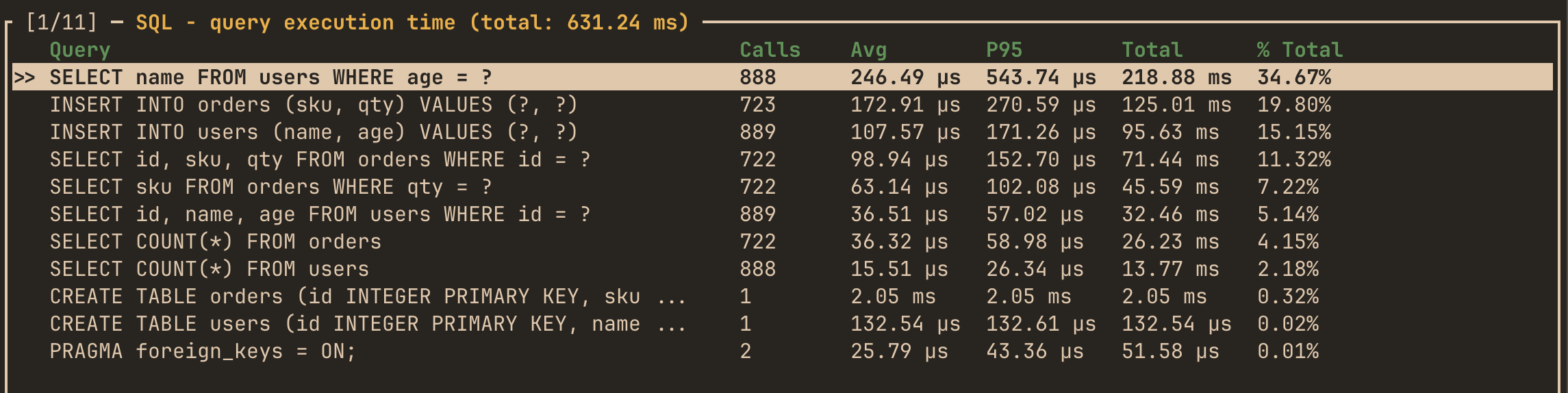
Live SQL metrics
Live SQL queries metrics display in the I/O -> SQL TUI tab:
Raw statement logs (opt-in)
Set HOTPATH_SQL_RAW_LOGS=1 to store the raw statement text in execution logs instead of the normalized form. Queries still merge into normalized buckets, but each log entry then shows the exact statement as sent to the database - so parameter-varied executions of one bucket stay distinguishable in the logs panel and inspect popup.
Privacy caveat: raw text exposes inline literals (values rendered into the SQL string, e.g. via format!) through the TUI and the unauthenticated local metrics server. Bound parameters (.bind(...)) are never visible either way - the driver only ever reports the placeholder form.