Lock contention monitoring: RwLocks and Mutexes
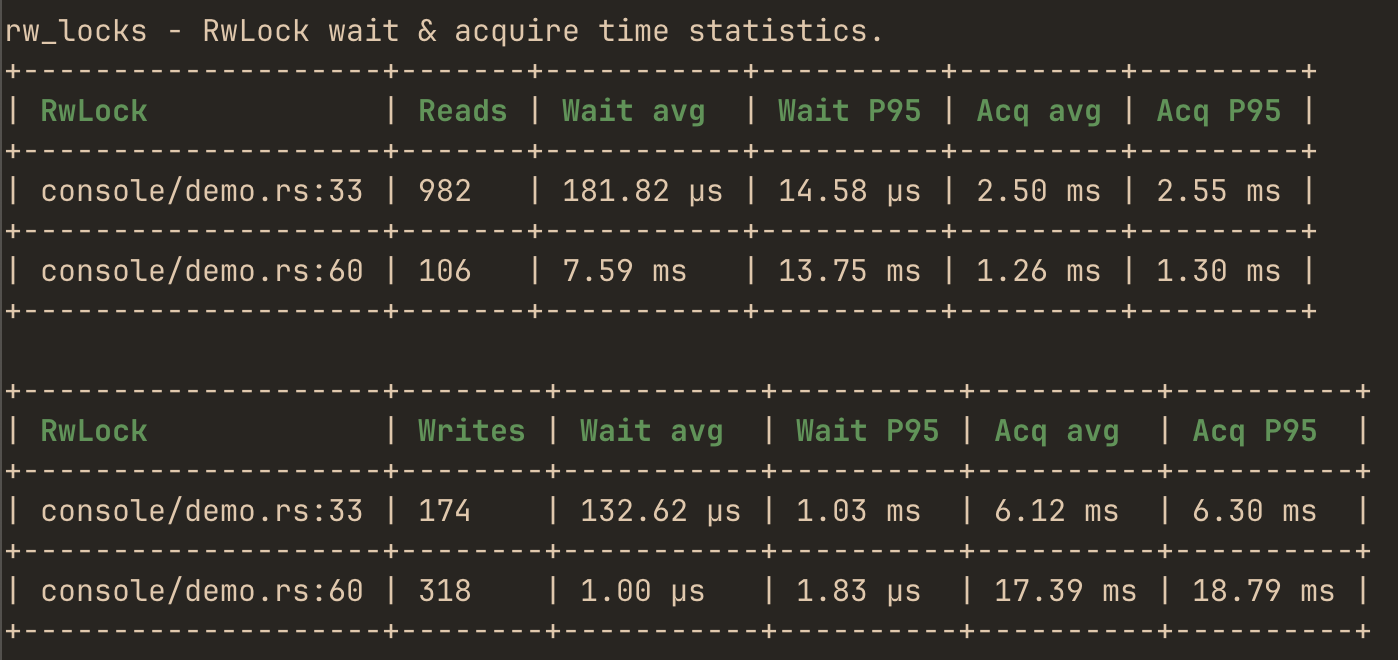
hotpath instruments synchronization primitives to surface lock contention - one of the common and hard-to-spot causes of latency in concurrent Rust. For every acquisition it tracks two durations:
- Wait time - how long a caller was blocked before the lock was granted. High wait time means contention: threads are queuing for the lock.
- Acquire time - how long the lock was held, from granted to released. Long hold times are what create the contention other threads wait on.
Both the rw_lock! and mutex! macros are noop unless the hotpath feature is activated.
The guide to Mutex and RwLock contention uses this report to find a long-held lock guard and fix it.
RwLocks
rw_lock! macro
Wrap a RwLock at creation. Read and write acquisitions are tracked separately, so you can see whether contention comes from readers, writers, or both.
let lock = hotpath::rw_lock!(std::sync::RwLock::new(0u32));

*lock.write().unwrap() += 1;
let _ = *lock.read().unwrap();
Use the label parameter to give the lock a readable name in the report (otherwise it is identified by file:line):
let lock = hotpath::rw_lock!(std::sync::RwLock::new(0u32), label = "config");Supported RwLock libraries
std::sync::RwLock can be instrumented by default. Enable the matching feature flag for each third-party library.
std
Built-in, no feature flag required.
parking_lot
Enable the parking_lot feature.
Tokio
Enable the tokio feature.
async-lock
Enable the async-lock feature.
Mutexes
mutex! macro
Wrap a Mutex at creation. A mutex has a single lock kind, so there is no read/write split - each row reports one set of wait and acquire stats.
let lock = hotpath::mutex!(std::sync::Mutex::new(0u64), label = "counter");

*lock.lock().unwrap() += 1;
The label parameter is optional; without it the lock is identified by file:line. Literal labels must be unique per lock kind within a crate (one label may name both a mutex and an rw_lock): a repeated one fails cargo build/test/run with symbol `__hotpath_unique_mutex_counter_<crate hash>` is already defined (cargo check does not report it). Labels passed as runtime expressions are not checked.
Supported Mutex libraries
std::sync::Mutex can be instrumented by default. Enable the matching feature flag for each third-party library.
std
Built-in, no feature flag required.
parking_lot
Enable the parking_lot feature.
Tokio
Enable the tokio feature.
async-lock
Enable the async-lock feature.
Limits
The number of locks shown per section is unlimited by default (0). Cap it with:
- Macro:
#[hotpath::main(rw_locks_limit = n, mutexes_limit = n)] - Builder:
.rw_locks_limit(n)/.mutexes_limit(n) - Env vars:
HOTPATH_RW_LOCKS_LIMIT/HOTPATH_MUTEXES_LIMIT
Wrapped types
rw_lock! and mutex! do not return the lock you passed in - they return an instrumented wrapper around it. The macro expands to a different type than the original:
// before: a plain std RwLock
let lock: std::sync::RwLock<u32> = std::sync::RwLock::new(0);

// after: the macro returns a hotpath wrapper, not std::sync::RwLock
let lock = hotpath::rw_lock!(std::sync::RwLock::new(0u32));
At a let binding this is invisible - type inference picks up whatever the macro returns. It only matters when you need to name the type, for example a struct field or a function signature. There you cannot write std::sync::RwLock<T>, because the value is a wrapper, not an std::sync::RwLock.
Use the hotpath::wrap:: path instead. It mirrors the standard module layout, so you prefix the original path with hotpath::wrap:::
// before
struct App {
    counter: std::sync::RwLock<u32>,
    name: std::sync::Mutex<String>,
}

// after - prefix the type with hotpath::wrap::
struct App {
    counter: hotpath::wrap::std::sync::RwLock<u32>,
    name: hotpath::wrap::std::sync::Mutex<String>,
}

let app = App {
    counter: hotpath::rw_lock!(std::sync::RwLock::new(0u32)),
    name: hotpath::mutex!(std::sync::Mutex::new(String::new())),
};
This is purely to keep the compiler police happy: hotpath::wrap::std::sync::RwLock is still noop unless the hotpath feature is enabled. With the feature off it is a plain re-export of std::sync::RwLock (zero overhead, identical behavior); with the feature on it resolves to the instrumented wrapper. Either way the field type lines up with what the macro returns, so the same code compiles in both configurations.