How to benchmark Rust applications and track performance changes
hotpath provides a simple way to execute benchmarks and compare results between app versions.
Start with installing the hotpath-utils CLI:
cargo install hotpath --bin hotpath-utils --version '^0.21' --features utils
This CLI needs JSON files with hotpath performance metrics as an input. See Profiling modes for more detailed info on how to generate these, and customize report sections.
Now run:
HOTPATH_OUTPUT_PATH=tmp/before.txt HOTPATH_OUTPUT_FORMAT=json \
cargo run --features='hotpath,hotpath-alloc'
and after checking out to a different commit run:
HOTPATH_OUTPUT_PATH=tmp/after.txt HOTPATH_OUTPUT_FORMAT=json \
cargo run --features='hotpath,hotpath-alloc'
Now you can provide the generated tmp/before.json and tmp/after.json files as an input to the command:
hotpath-utils compare \
--before-json-path tmp/before.txt \
--after-json-path tmp/after.txt
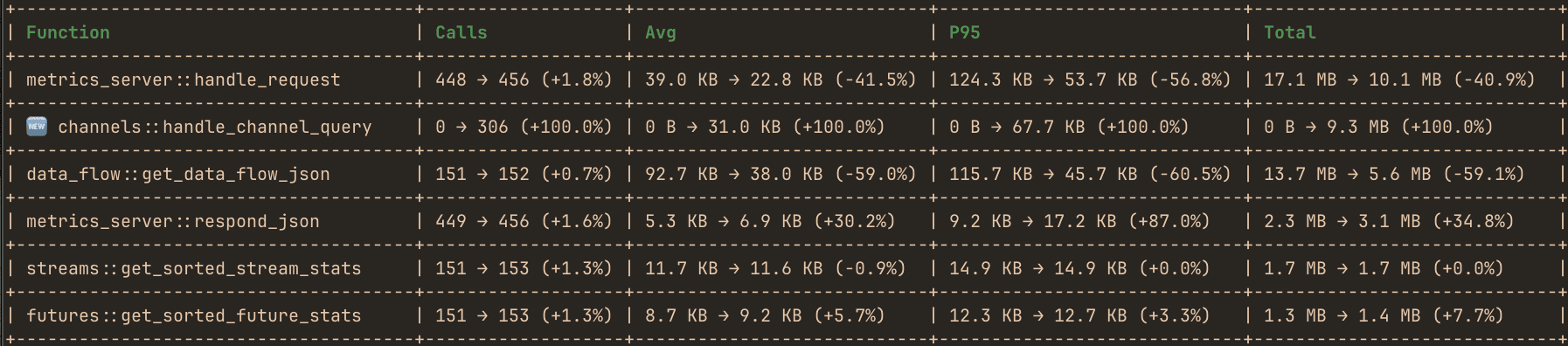
It will print a similar table, showcasing how measured performance metrics changed between the two benchmarks.
Optionally you can set:
HOTPATH_REPORT_LABEL="$(git branch --show-current)@$(git rev-parse --short HEAD)"
for cargo command to annotate reports with current git branch and commit hash.
See compare.sh for an example of A/B benchmark used in hotpath development.